Collaboration Panel
The Collaboration Panel provides a common interface to track activities related to a Quote or Deal in the application. You can access this feature by clicking the  icon on the right pane at all the screens in the quote flow.
The Collaboration Panel consists of Customer Info and Deal Wall.
Customer Info
You can view the customer’s information such as Customer Name, Quote ID, Industry Type, and Address.
This information is available in view mode.
Deal Wall
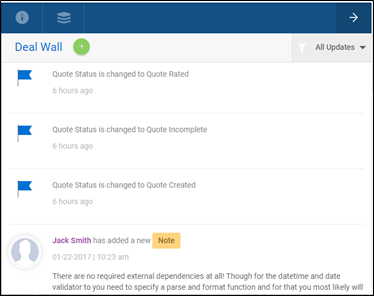
Click on the Deal Wall as shown in the screen above, and you can view the activities related to the quote in the live feed. This data is visible to all users involved in the processing of the quote based on rights and permissions.
You can perform the following functions through Deal Wall:
-
Add attachments related to a quote
-
Add notes to capture important information for a specific quote
-
View system generated events to track status changes in the system
At any point, you can view 10 latest updates (example: notes, attachments), and you can click on Show More to view the next 10 updates.
If there are no records in the Deal Wall, the screen displays, "No records found".
To add attachments or notes, click on the  icon and select Attachment or Note that you wish to add.
You can filter the events or attachments or notes through the All Updates dropdown list on the Deal Wall screen.
Attachments
Through Attachments, you can perform these functions:
-
Attach any document related to a quote (by choosing the document type and providing description)
-
Upload one attachment at a time
-
Delete the attachment that you have added in the live feed
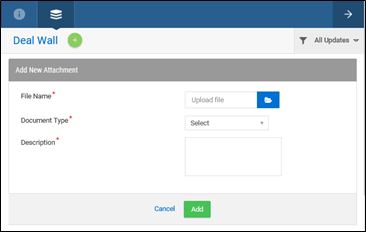
Note: When Agents add attachments, all the users working on the quote can view the attachments.
Notes
You can add a note by providing Subject, Status, Notes Type, Priority, and Description details.
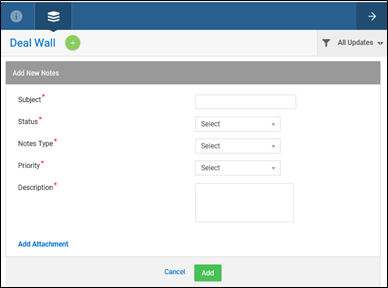
The added notes appear in the live feed of the Deal Wall (with your name or username who has added the note) along with the date and time of creation.
All the users working on a specific quote can view the notes added to that quote.
Note: When Agents add notes, all the users working on the quote can view the notes.
Events
The Deal Wall will be updated with an 'Event' when the status of the quote changes as follows:
-
When the quote/application moves from one status to another.
-
When Underwriter requests more information.
-
When application is reassigned to another user.
The status of the quote changes during any of the above mentioned activities, and you (including users working on the quote) can view these system generated events on the live feed.